Create smart digital invoices in a couple of clicks
Tidy generates professional looking invoices and sends them automatically when a payment is taken in-person, or you can choose to create invoice with a direct payment link to your bank.
Automate your invoicing with Tidy
Whether you’re a freelancer, small business owner or one man band, presenting your clients with a professional, clear invoice establishes credibility, and is essential to getting paid.
Tidy simplifies this process by allowing you to set up an invoice customised to your business, with colours and typestyles you prefer, and a logo or photo if you have one. You can select to add your VAT number if you’re VAT registered, and show prices inclusive or exclusive of VAT.
Once you have set up your invoice template, Tidy automatically generates invoices from your job schedule data. It sends a payment confirmation and generates a professional invoice for you to send for every payment made via the Tidy app, and includes a payment link direct to your bank if a payment has not been taken in-person via Tap to Pay or the QR code payment options.
Gone are the days of writing totals on scraps of paper or sending paper invoices. With Tidy, you can automate your invoicing, present a tech-savvy, professional approach, and streamline your business admin making your accounting easier.
Create invoices and manage payments with Tidy
With Tidy, creating and managing invoices is hassle-free. Here’s how Tidy simplifies the process:
Be organised
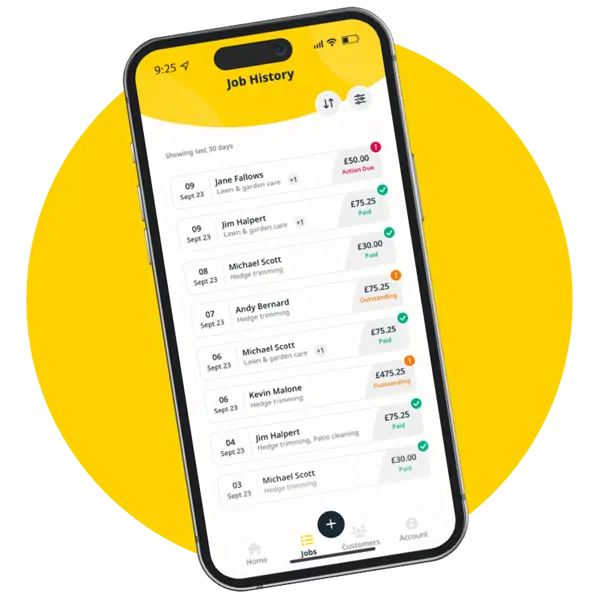
Add your business details, clients and jobs to the Tidy App. Once set up, Tidy will automatically generate invoices for you, saving time and reducing errors.
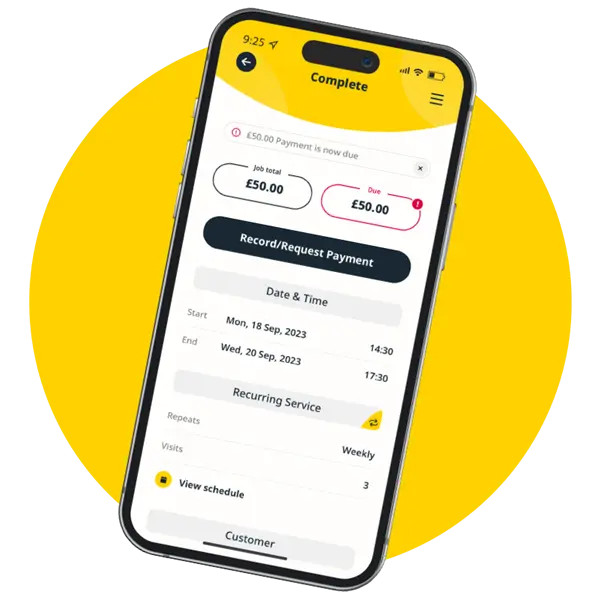
Request payment
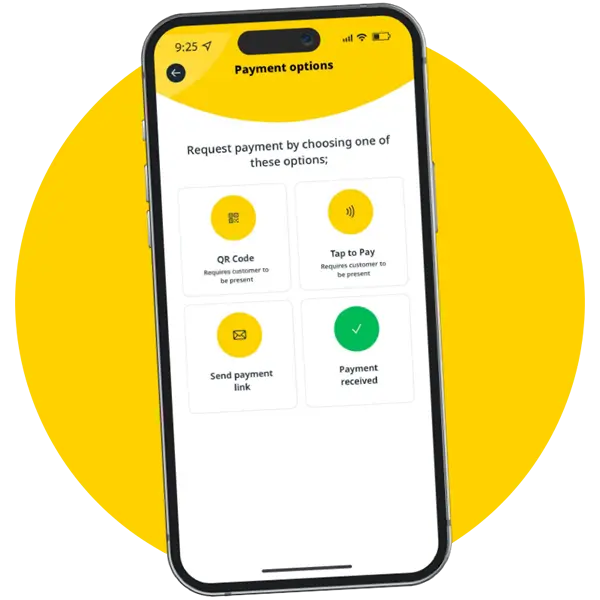
Tidy provides you and your client with four simple payment options, in-person through Tap to Pay or generating a QR Code, or you can log a cash payment.
Send invoices
Or you can select ‘send payment link’. Tidy automatically generates and sends a digital invoice for all of our payment options except cash payments.
Key benefits of creating invoices with Tidy:
Fast, efficient and trackable: Create invoice template in minutes and easily automate your invoicing and track payments too.
Professional appearance: Present your clients with well-designed, professional invoices that help build trust and credibility.
Customisable and branded: Personalise your invoices with your logo, business name, and custom details.
Faster payments: Send direct payment links that make it easy for customers to pay you, or get paid instantly with Tap to Pay.
Batch invoicing: If you need to invoice the same amount to multiple clients, create the invoice and then select the clients you wish to send it to. Simple!
Accurate record keeping: Generates digital records for easy tracking, filing, and accounting.
Simplified accounting: Automatically store and organise all your invoices in one place, making book keeping easier and more accurate.
Getting started with Tidy is simple and quick. In just minutes, you can be up and running, with a Stripe account connected, Tap to Pay activated, and your first invoice ready to send. We’ve streamlined the process to ensure you spend less time on admin and more time doing what you love. We’ve made the process as effortless and user friendly as possible – because we’re all about working smarter not harder!
Here’s how to get started:
Download the Tidy App: Install the Tidy app on your device and login with your email and mobile number.
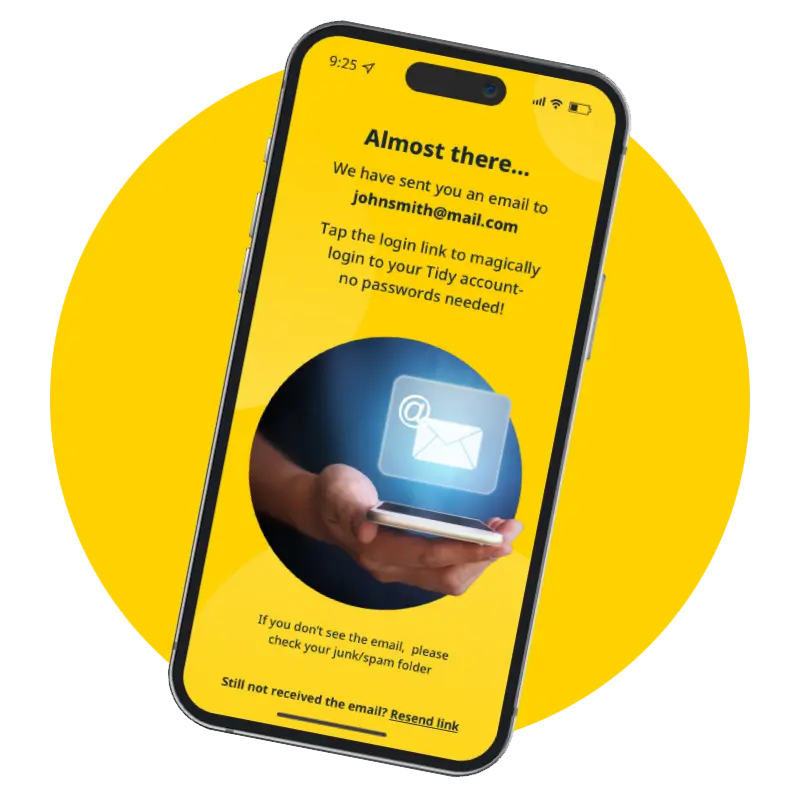
Click the magic link: No passwords required - simply click the magic link sent to your email.
Complete your profile: Add your name, photo, business name, and logo (optional) to personalise your invoices.
Connect your Stripe* account: Link a new or existing Stripe account to start accepting payments via the app.
Activate Tap to Pay*: Set up Tap to Pay for fast in-person payments.
Start creating invoices: Add your clients, jobs, and generate invoices with just a few clicks.
*Fees Apply.
Create invoices and get paid faster with Tidy
With Tidy, you can create and send professional invoices effortlessly. Say goodbye to the chaos of paper invoices and hello to a streamlined, digital invoicing system that makes your business look more efficient and tech-savvy.
Get started today, and make invoicing as easy as clicking a button.
payment, invoice, mobile app, accounting, tradesperson, credit, electrician, plumber, trade, invoices, quoting, invoicing, invoice app, invoicing app, quotes and invoices, book a demo, send invoices, xero, general contractor, payments, tradespeople, send, contractors, app, easy, electrical, bank, payment gateway, pdf, invoice maker, mobile device, apple pay, sales, google pay, client, pay, stripe, mobile, customers, payment method, online, custom invoice, bank account, freshbooks, quickbooks, contract, square invoices, time tracking, zoho invoice, track time, zoho, free invoice app uk, best invoice app uk, invoice app free uk, freelancer, sumup, expense management
Frequently Asked Questions
How can I create and send invoices using an app?
Creating and sending invoices using an app is straightforward. Simply log into the app, select the invoice template, customise it with your branding and client details, then send it directly via email or a payment link for efficient processing.
What features should I look for in an invoicing app?
The features to look for in an invoicing app include automation for recurring invoices, custom branding options, multiple payment processing methods, client management capabilities, and real-time payment tracking to streamline your billing process effectively.
Can I manage client information through an invoicing app?
You can manage client information through an invoicing app. Tidy allows you to store and organise client details, making it easy to access and update information as needed, streamlining your invoicing process.
How do I create invoices on my phone?
Creating invoices on your phone is simple with Tidy. Just open the app, select the invoice feature, input your details, customize it if desired, and then send it directly to your client.
What are essential features of invoicing apps?
The essential features of invoicing apps include automated invoice generation, custom branding options, multiple payment processing methods, client management tools, and payment tracking capabilities, all designed to streamline the billing process for freelancers and small business owners.
Can I customise invoices in the app?
You can customise invoices in the app. Tidy allows you to personalise your invoices with your branding, including logos, colours, and specific layouts, ensuring they reflect your unique business identity.
How to automate invoice sending with an app?
Automating invoice sending with an app involves setting up templates and scheduling features within the application. By configuring client details and payment terms, you can streamline the process to send invoices automatically at specified intervals, saving time and ensuring timely billing.
Is client management available in invoicing apps?
Client management is indeed available in invoicing apps. These applications typically offer features to store client information, track interactions, and manage payment histories, streamlining the invoicing process for freelancers and small business owners.
What payment methods can I integrate?
The payment methods you can integrate include credit and debit cards, PayPal, and bank transfers, allowing for seamless transactions and flexibility in how your clients can pay their invoices.
How secure is client data in invoicing apps?
The security of client data in invoicing apps is paramount. Tidy employs advanced encryption and secure storage protocols to protect sensitive information, ensuring that client data remains confidential and safe from unauthorised access.
Can I track invoice status through the app?
You can track invoice status through the app. Tidy allows you to easily monitor whether invoices have been sent, viewed, or paid, ensuring you stay updated on your billing process.
How to generate reports from invoicing software?
Generating reports from invoicing software involves accessing the reporting feature within the application, selecting the desired report type, and specifying the date range or criteria. This allows you to view and analyse your invoicing data efficiently.
What is the best invoicing app for freelancers?
The best invoicing app for freelancers is one that streamlines billing processes, like Tidy. It offers features for easy invoice creation, payment management, and client tracking, helping freelancers save time and maintain professionalism.
How to set up recurring invoices in the app?
Setting up recurring invoices in the app is straightforward. Simply navigate to the invoicing section, select 'Create Invoice', then choose the 'Recurring' option. Fill in the necessary details, set your frequency, and save to automate future billing.
Can I send invoices internationally using the app?
You can send invoices internationally using the app. Tidy supports multiple currencies and payment methods, making it easy to manage international billing efficiently.
What are the costs associated with invoicing apps?
The costs associated with invoicing apps typically include subscription fees, which can vary based on features, and transaction fees for payment processing. Some apps may offer free versions with limited functionality, while others provide tiered pricing plans for advanced features.
How to integrate invoicing with accounting software?
Integrating invoicing with accounting software simplifies your financial management. To do this, connect Tidy with your preferred accounting software through the integration settings, allowing seamless data transfer for invoices and payments.
Can I access invoices from multiple devices?
You can access invoices from multiple devices using Tidy. The application is cloud-based, allowing you to manage your invoices seamlessly from any device with internet connectivity.
How to handle late payments through the app?
Handling late payments through the app involves setting up automated reminders for clients, allowing you to send follow-up invoices easily. You can also customise payment terms and track outstanding payments to ensure timely follow-ups.
What support options are available for invoicing apps?
The support options available for invoicing apps typically include online help centres, live chat, email support, and phone assistance, ensuring users can easily access help and resources for managing their invoicing needs.
How to customise invoice templates in the app?
Customising invoice templates in the app is straightforward. Simply navigate to the "Templates" section, select your preferred template, and use the editing tools to modify elements such as logos, colours, and fonts to match your brand.
Can I add my branding to invoices?
You can add your branding to invoices with Tidy. Customise your invoices by incorporating your logo, colours, and fonts, ensuring a professional and personalised touch that reflects your business identity.
How to manage multiple clients in the app?
Managing multiple clients in the app is straightforward. You can easily create, customise, and store invoices for each client, track their payments, and organise client information, ensuring efficient billing and professional management of your client relationships.
What are the benefits of using an invoicing app?
The benefits of using an invoicing app include streamlined billing processes, automated invoicing, and customisation options for branding. It also simplifies payment management, allowing users to track payments efficiently and maintain professional client interactions.
How to ensure compliance with invoicing regulations?
Ensuring compliance with invoicing regulations involves understanding local laws, including tax requirements and mandatory invoice details. Use Tidy's features to customise invoices accurately and maintain records for audits, ensuring all legal obligations are met.
Can I schedule invoice reminders for clients?
You can schedule invoice reminders for clients using Tidy. This feature allows you to automate reminders, ensuring timely payments and helping you maintain a professional relationship with your clients.
How to import client information into the app?
Importing client information into the app is straightforward. Simply navigate to the 'Clients' section, select 'Import', and upload your client data file in the supported format. Follow the prompts to complete the process efficiently.
What features enhance invoicing efficiency?
The features that enhance invoicing efficiency include automated invoice generation, custom branding options, streamlined payment processing through direct links, and client management tools that facilitate tracking payments and organising client information.
How to resolve issues with invoice delivery?
To resolve issues with invoice delivery, first, check your email settings and ensure that invoices are being sent to the correct addresses. If problems persist, review your internet connection and consider resending the invoice directly through Tidy's platform.
Can I use the app offline for invoicing?
The ability to use the app offline for invoicing is limited. Tidy requires an internet connection to generate and send invoices, but you can prepare drafts offline for later use.

quick billing, generate invoices, Tidy generate invoices, Tidy invoice generation, create invoices app, digital invoices UK, small business invoicing, invoice generator for tradespeople, mobile invoicing app, online invoice software UK, fast invoicing, send invoices from phone, invoice and billing app, self-employed invoicing tool, professional invoices UK, invoice automation, invoice & payment link, secure invoicing, get paid quicker, invoice scheduling, bookkeeping invoices UK, small business billing tool, tradesperson invoicing app
payment, invoice, mobile app, accounting, tradesperson, credit, electrician, plumber, trade, invoices, quoting, invoicing, invoice app, invoicing app, quotes and invoices, book a demo, send invoices, xero, general contractor, payments, tradespeople, send, contractors, app, easy, electrical, bank, payment gateway, pdf, invoice maker, mobile device, apple pay, sales, google pay, client, pay, stripe, mobile, customers, payment method, online, custom invoice, bank account, freshbooks, quickbooks, contract, square invoices, time tracking, zoho invoice, track time, zoho, free invoice app uk, best invoice app uk, invoice app free uk, freelancer, sumup, expense management
Frequently Asked Questions
How can I create and send invoices using an app?
Creating and sending invoices using an app is straightforward. Simply log into the app, select the invoice template, customise it with your branding and client details, then send it directly via email or a payment link for efficient processing.
What features should I look for in an invoicing app?
The features to look for in an invoicing app include automation for recurring invoices, custom branding options, multiple payment processing methods, client management capabilities, and real-time payment tracking to streamline your billing process effectively.
Can I manage client information through an invoicing app?
You can manage client information through an invoicing app. Tidy allows you to store and organise client details, making it easy to access and update information as needed, streamlining your invoicing process.
How do I create invoices on my phone?
Creating invoices on your phone is simple with Tidy. Just open the app, select the invoice feature, input your details, customize it if desired, and then send it directly to your client.
What are essential features of invoicing apps?
The essential features of invoicing apps include automated invoice generation, custom branding options, multiple payment processing methods, client management tools, and payment tracking capabilities, all designed to streamline the billing process for freelancers and small business owners.
Can I customise invoices in the app?
You can customise invoices in the app. Tidy allows you to personalise your invoices with your branding, including logos, colours, and specific layouts, ensuring they reflect your unique business identity.
How to automate invoice sending with an app?
Automating invoice sending with an app involves setting up templates and scheduling features within the application. By configuring client details and payment terms, you can streamline the process to send invoices automatically at specified intervals, saving time and ensuring timely billing.
Is client management available in invoicing apps?
Client management is indeed available in invoicing apps. These applications typically offer features to store client information, track interactions, and manage payment histories, streamlining the invoicing process for freelancers and small business owners.
What payment methods can I integrate?
The payment methods you can integrate include credit and debit cards, PayPal, and bank transfers, allowing for seamless transactions and flexibility in how your clients can pay their invoices.
How secure is client data in invoicing apps?
The security of client data in invoicing apps is paramount. Tidy employs advanced encryption and secure storage protocols to protect sensitive information, ensuring that client data remains confidential and safe from unauthorised access.
Can I track invoice status through the app?
You can track invoice status through the app. Tidy allows you to easily monitor whether invoices have been sent, viewed, or paid, ensuring you stay updated on your billing process.
How to generate reports from invoicing software?
Generating reports from invoicing software involves accessing the reporting feature within the application, selecting the desired report type, and specifying the date range or criteria. This allows you to view and analyse your invoicing data efficiently.
What is the best invoicing app for freelancers?
The best invoicing app for freelancers is one that streamlines billing processes, like Tidy. It offers features for easy invoice creation, payment management, and client tracking, helping freelancers save time and maintain professionalism.
How to set up recurring invoices in the app?
Setting up recurring invoices in the app is straightforward. Simply navigate to the invoicing section, select 'Create Invoice', then choose the 'Recurring' option. Fill in the necessary details, set your frequency, and save to automate future billing.
Can I send invoices internationally using the app?
You can send invoices internationally using the app. Tidy supports multiple currencies and payment methods, making it easy to manage international billing efficiently.
What are the costs associated with invoicing apps?
The costs associated with invoicing apps typically include subscription fees, which can vary based on features, and transaction fees for payment processing. Some apps may offer free versions with limited functionality, while others provide tiered pricing plans for advanced features.
How to integrate invoicing with accounting software?
Integrating invoicing with accounting software simplifies your financial management. To do this, connect Tidy with your preferred accounting software through the integration settings, allowing seamless data transfer for invoices and payments.
Can I access invoices from multiple devices?
You can access invoices from multiple devices using Tidy. The application is cloud-based, allowing you to manage your invoices seamlessly from any device with internet connectivity.
How to handle late payments through the app?
Handling late payments through the app involves setting up automated reminders for clients, allowing you to send follow-up invoices easily. You can also customise payment terms and track outstanding payments to ensure timely follow-ups.
What support options are available for invoicing apps?
The support options available for invoicing apps typically include online help centres, live chat, email support, and phone assistance, ensuring users can easily access help and resources for managing their invoicing needs.
How to customise invoice templates in the app?
Customising invoice templates in the app is straightforward. Simply navigate to the "Templates" section, select your preferred template, and use the editing tools to modify elements such as logos, colours, and fonts to match your brand.
Can I add my branding to invoices?
You can add your branding to invoices with Tidy. Customise your invoices by incorporating your logo, colours, and fonts, ensuring a professional and personalised touch that reflects your business identity.
How to manage multiple clients in the app?
Managing multiple clients in the app is straightforward. You can easily create, customise, and store invoices for each client, track their payments, and organise client information, ensuring efficient billing and professional management of your client relationships.
What are the benefits of using an invoicing app?
The benefits of using an invoicing app include streamlined billing processes, automated invoicing, and customisation options for branding. It also simplifies payment management, allowing users to track payments efficiently and maintain professional client interactions.
How to ensure compliance with invoicing regulations?
Ensuring compliance with invoicing regulations involves understanding local laws, including tax requirements and mandatory invoice details. Use Tidy's features to customise invoices accurately and maintain records for audits, ensuring all legal obligations are met.
Can I schedule invoice reminders for clients?
You can schedule invoice reminders for clients using Tidy. This feature allows you to automate reminders, ensuring timely payments and helping you maintain a professional relationship with your clients.
How to import client information into the app?
Importing client information into the app is straightforward. Simply navigate to the 'Clients' section, select 'Import', and upload your client data file in the supported format. Follow the prompts to complete the process efficiently.
What features enhance invoicing efficiency?
The features that enhance invoicing efficiency include automated invoice generation, custom branding options, streamlined payment processing through direct links, and client management tools that facilitate tracking payments and organising client information.
How to resolve issues with invoice delivery?
To resolve issues with invoice delivery, first, check your email settings and ensure that invoices are being sent to the correct addresses. If problems persist, review your internet connection and consider resending the invoice directly through Tidy's platform.
Can I use the app offline for invoicing?
The ability to use the app offline for invoicing is limited. Tidy requires an internet connection to generate and send invoices, but you can prepare drafts offline for later use.