Frequently Asked Questions
How can teams use Tidy effectively?
Teams can use Tidy effectively by leveraging its features to manage members, schedule jobs, and process payments seamlessly, thereby streamlining operations and enhancing communication within the team for improved efficiency.
What features does Tidy offer for scheduling?
Tidy offers several features for scheduling, including easy job scheduling, team member availability tracking, and automated reminders. These tools help streamline the scheduling process, ensuring efficient management of service appointments and optimal team utilisation.
How to manage team payments with Tidy?
Managing team payments with Tidy involves using the platform's payment features to easily process and track payments for your team members. Simply set up payment methods, assign jobs, and Tidy will handle the rest, ensuring timely and accurate payments.
What are the benefits of using Tidy?
The benefits of using Tidy include streamlined team management, efficient job scheduling, and simplified payment processing, all designed to enhance productivity and organisation for service-based businesses.
How does Tidy streamline team administration?
Tidy streamlines team administration by centralising team management, scheduling jobs, and processing payments on a single platform, which enhances efficiency and simplifies communication for service-based businesses.
Can Tidy help with job scheduling?
Tidy can assist with job scheduling by providing an intuitive platform that allows users to efficiently organise and manage their service appointments, ensuring timely execution and improved team coordination.
What tools does Tidy provide for teams?
Tidy provides essential tools for teams, including features for adding team members, scheduling jobs, and managing payments, all designed to streamline operations and enhance collaboration within service-based businesses.
How to add team members in Tidy?
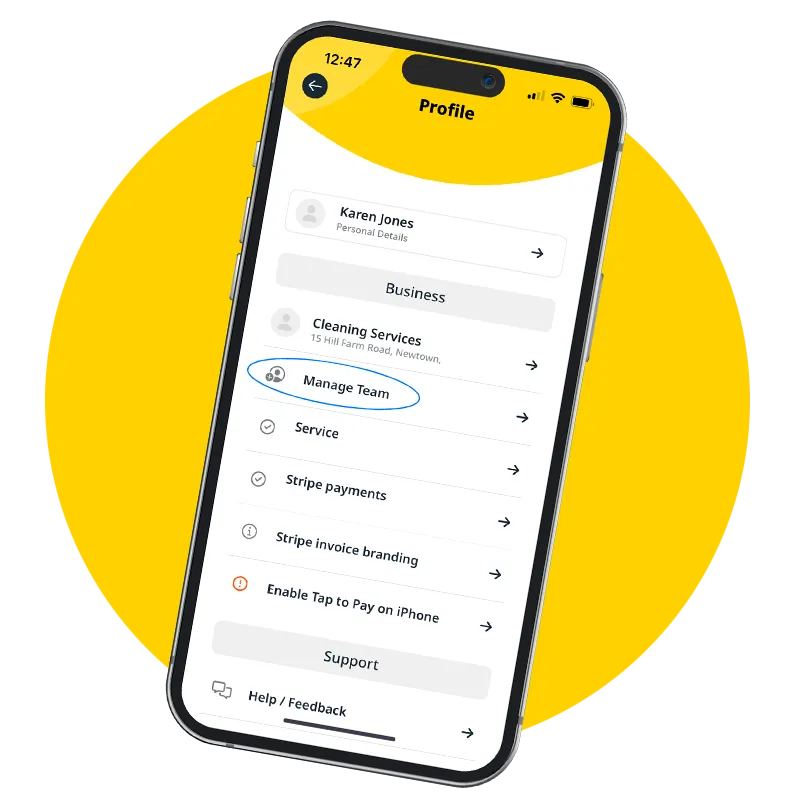
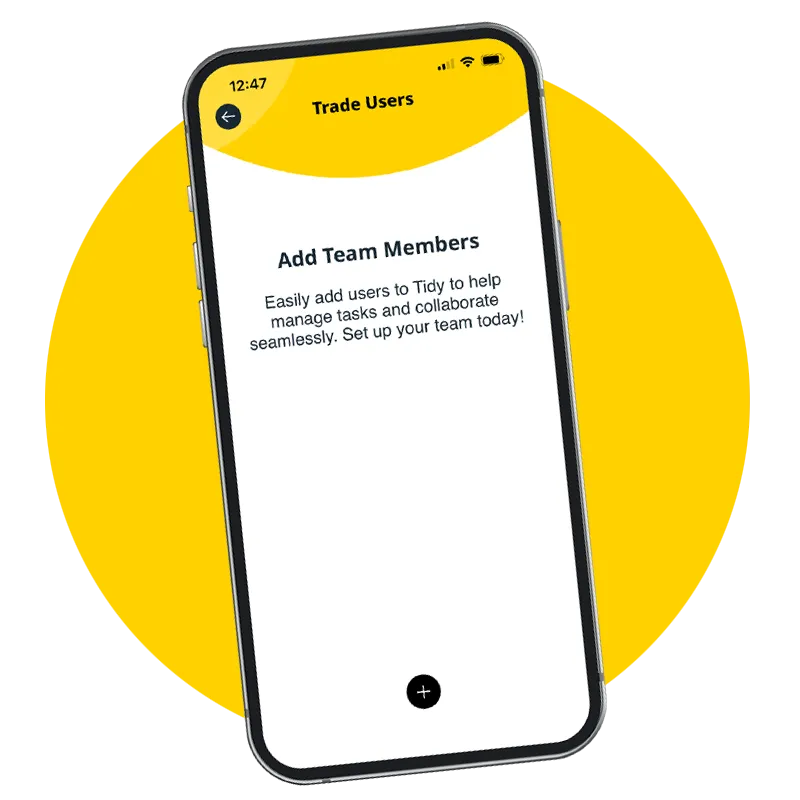
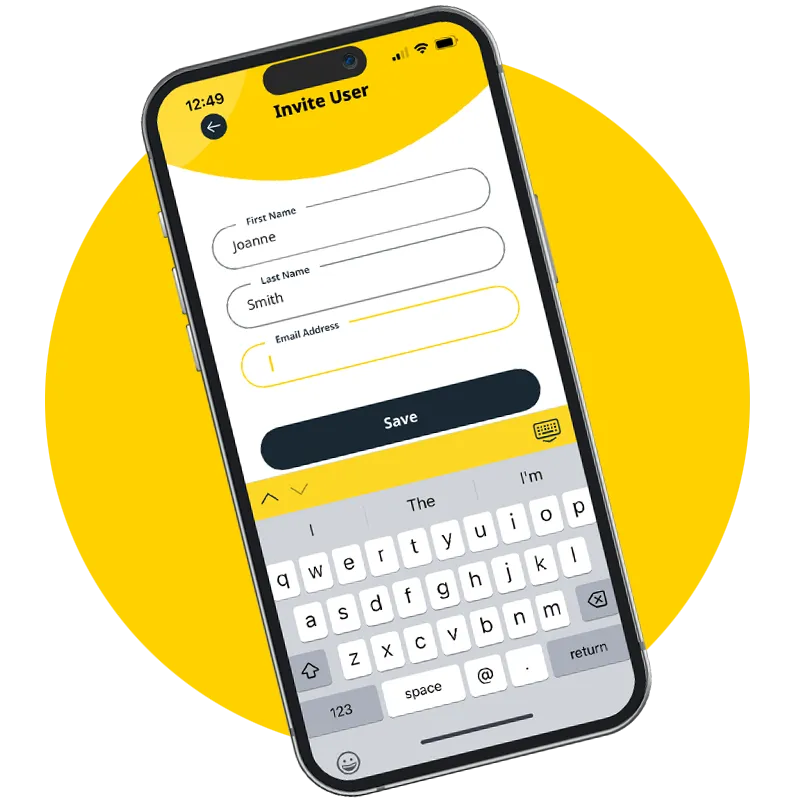
To add team members in Tidy, navigate to the team management section, click on "Add Team Member," and fill in the required details such as name and email. This process allows for efficient team collaboration and job management.
What is the process for scheduling jobs?
The process for scheduling jobs involves selecting the desired date and time, assigning team members, and confirming the job details within the Tidy platform, ensuring efficient management of your service-based business.
How does Tidy facilitate team communication?
Tidy facilitates team communication by providing a centralised platform where team members can easily share updates, assign tasks, and discuss job details in real-time, ensuring everyone stays informed and connected for efficient collaboration.
What are the key functionalities of Tidy?
The key functionalities of Tidy include team management, job scheduling, and payment facilitation, all designed to streamline operations for service-based businesses and enhance efficiency in managing customer interactions.
How can Tidy improve team efficiency?
Tidy can significantly improve team efficiency by centralising task management, enabling seamless scheduling of jobs, and streamlining payment processes, which allows team members to focus on their core responsibilities without administrative distractions.
What types of businesses benefit from Tidy?
The types of businesses that benefit from Tidy include service-based companies, such as cleaning services, landscaping, and maintenance providers, which require efficient team management, job scheduling, and streamlined payment processes.
How to customise Tidy for my team?
Customising Tidy for your team involves setting up user roles, adding team members, and tailoring job schedules to fit your workflow. Use the platform's settings to adjust features according to your team's specific needs and preferences.
What support does Tidy offer for users?
Tidy offers comprehensive support for users, including a dedicated help centre, tutorials, and responsive customer service to assist with team management, job scheduling, and payment processing.
How to track team performance in Tidy?
Tracking team performance in Tidy involves using the platform's reporting tools to monitor job completion rates, employee productivity, and customer feedback, allowing you to assess individual and team effectiveness efficiently.
What integrations are available with Tidy?
The integrations available with Tidy include popular tools such as Google Calendar for scheduling, payment processors like Stripe for seamless transactions, and various communication platforms to enhance team collaboration, ensuring a streamlined workflow for service-based businesses.
How to set up payments in Tidy?
Setting up payments in Tidy involves navigating to the payments section in your account settings, linking your bank account or payment processor, and configuring your payment preferences to ensure smooth transactions for your service-based business.
What is the user experience like with Tidy?
The user experience with Tidy is seamless and intuitive, allowing service-based businesses to efficiently manage teams, schedule jobs, and process payments all in one platform. Users appreciate its simplicity and effectiveness in streamlining operations.
How does Tidy handle customer job management?
Tidy handles customer job management by providing a streamlined platform for scheduling, tracking, and managing jobs efficiently. Users can easily assign tasks to team members, monitor progress, and ensure timely payments, enhancing overall operational productivity.
What are the best practices for using Tidy?
The best practices for using Tidy include regularly updating team member information, efficiently scheduling jobs to maximise productivity, and utilising the payment features to streamline transactions. This ensures effective team management and enhances overall operational efficiency.
How to optimise team workflows with Tidy?
Optimising team workflows with Tidy involves centralising task management, scheduling jobs efficiently, and streamlining payment processes. By leveraging Tidy’s features, teams can enhance collaboration and productivity, ensuring smoother operations and improved service delivery.
What feedback do users give about Tidy?
User feedback about Tidy highlights its user-friendly interface, efficient team management features, and streamlined job scheduling and payment processes, making it a valuable tool for service-based businesses.
How to ensure data security in Tidy?
Ensuring data security in Tidy involves implementing robust encryption protocols, regular software updates, and user access controls. Additionally, Tidy prioritises data protection through compliance with industry standards and continuous monitoring for potential security threats.
What training resources does Tidy provide?
Tidy provides a range of training resources, including comprehensive guides, video tutorials, and live webinars, designed to help users effectively manage their teams and utilise the platform's features for optimal business operations.
How to troubleshoot common issues in Tidy?
Troubleshooting common issues in Tidy involves checking your internet connection, ensuring all team members are correctly added, and reviewing job schedules for conflicts. If problems persist, consult Tidy's support resources or contact customer service for assistance.
What are the pricing options for Tidy?
The pricing options for Tidy include flexible plans tailored to service-based businesses, allowing users to choose a package that best fits their needs and budget. For detailed pricing information, please visit our website.
How to migrate to Tidy from another platform?
Migrating to Tidy from another platform involves exporting your existing data, such as team member details and job schedules, and then importing it into Tidy. Follow our step-by-step guide for a smooth transition.
What are the latest updates in Tidy?
The latest updates in Tidy include enhanced team management features, improved job scheduling tools, and streamlined payment processing, all designed to boost efficiency for service-based businesses.